Migrate Microsoft Azure Native Firewall with the Firewall Migration Tool in Security Cloud Control
This task allows migrating configurations from Azure firewall to threat defense devices managed by your Cloud-Delivered Firewall Management Center. You can manually derive the configuration file from your Azure firewall and upload it to the migration tool to begin your migration.
The Firewall migration tool in Security Cloud Control enables configuration upload, target selection, validation, and deployment. To learn about supported Azure firewall configurations, see Azure Configuration Support.
Procedure
Step 1 | On the Select Source Configuration page, choose Microsoft Azure and click Start Migration. | |||||||||||||||||||||||||||||||||||
Step 2 | Click Upload to choose the Azure configuration file and click Next. | |||||||||||||||||||||||||||||||||||
Step 3 | In the Select Target page, select the Cloud-Delivered Firewall Management Center provisioned on your Security Cloud Control tenant. The threat defense devices managed by that management center are listed. You can choose the threat defense device you wish to migrate the configuration to, and proceed with the migration. The threat defense devices listed are displayed either as In Use or Available based on whether the device is being used in another migration instance. However, you can perform an override by clicking Change Device Status, selecting the device from the In Use list, and clicking Continue, which will make the device available for being selected as the target. Choosing Proceed without FTD pushes only NAT objects, ACLs, and port objects to the Cloud-Delivered Firewall Management Center. For more information about the commonly used ASA features and their equivalent threat defense features, see Cisco Secure Firewall ASA to Threat Defense Feature Mapping guide.
The flowchart that follows illustrates the step-by-step procedure for migration of Azure firewall configurations to threat defense devices: To perform the procedure with more detailed steps, continue to Export the Configuration from Microsoft Azure Native Firewall in Migrating Microsoft Azure Native Firewall to Cisco Secure Firewall Threat Defense with the Migration Tool guide. 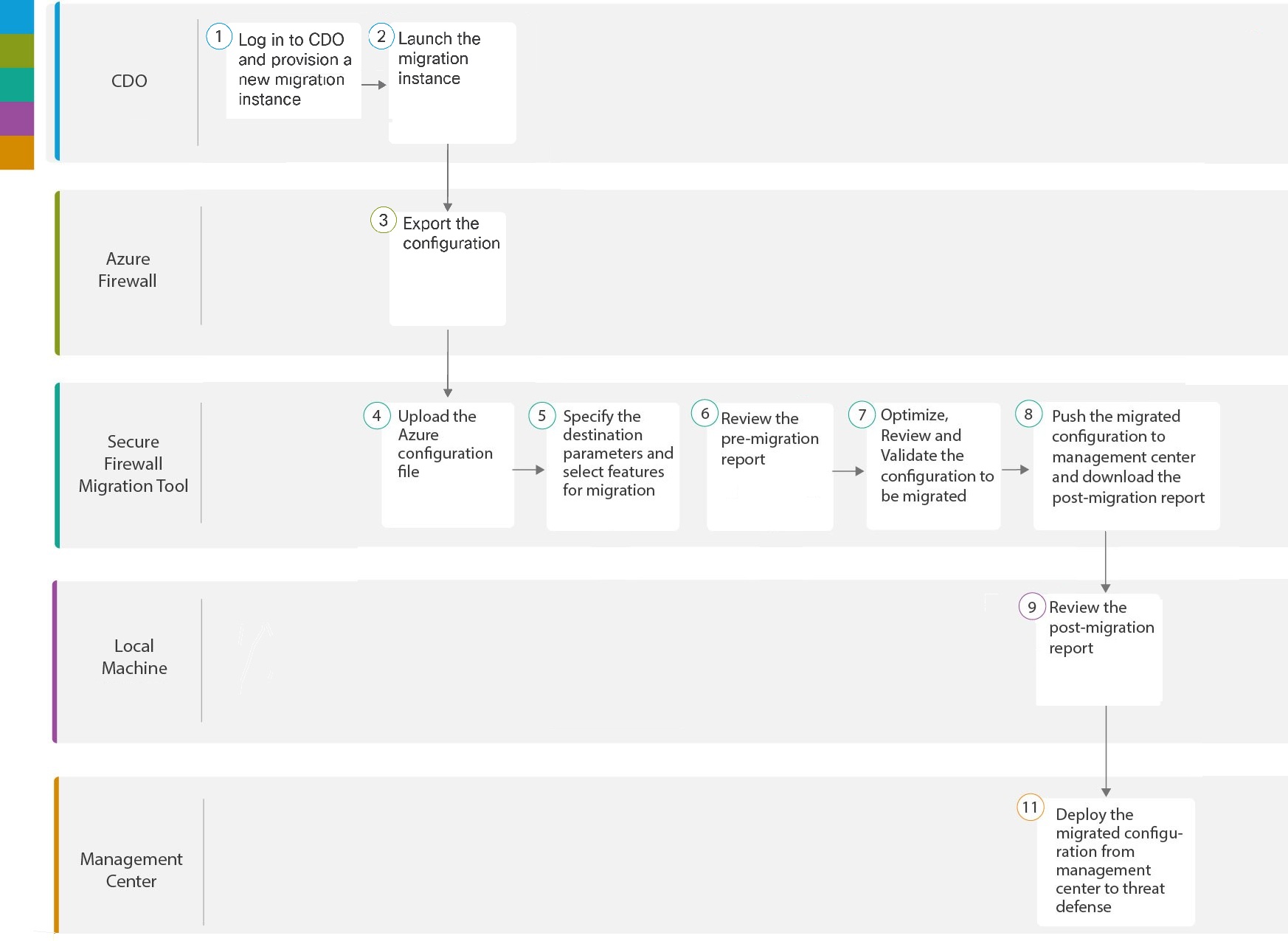
|

 button to start provisioning a new migration instance.


The Microsoft Azure Native Firewall configuration is successfully migrated to Secure Firewall Threat Defense, with the configuration validated and deployed through the Firewall Migration Tool.