Migrate Palo Alto Networks Firewall to Multicloud Defense with the Firewall Migration Tool in Security Cloud Control
This task allows you to migrate configurations from Palo Alto Networks firewall to Multicloud Defense using the Secure Firewall migration tool hosted on Security Cloud Control.
The Secure Firewall migration tool hosted on Security Cloud Control lets you migrate configurations from Palo Alto Networks firewall to Multicloud Defense. To read more about the supported configurations for this migration, see PAN Firewall Configuration Support for Multicloud Defense in Migrating Palo Alto Networks Firewall to Cisco Multicloud Defense with the Migration Tool guide.
Before you begin
Follow these steps to migrate Palo Alto Networks firewall configurations to Multicloud Defense:
Procedure
Step 1 | In the left pane, navigate to , provision a new migration instance, and click Launch. |
Step 2 | Export the configuration from your Palo Alto Networks Firewall. For detailed steps to export the configuration from Palo Alto Networks Firewall, see Export the Configuration from Palo Alto Networks Firewall. |
Step 3 | Select the source configuration by choosing Palo Alto Networks (6.1+) in the Source Firewall Vendor drop-down and upload the extracted configuration file to Firewall Migration Tool. To read about the Palo Alto Networks firewall configurations that are supported for migration and the limitations around them, see Guidelines and Limitations in the Migrating Palo Alto Networks Firewall to Cisco Multicloud Defense with the Migration Tool book. |
Step 4 | On the Select Target page, choose Multicloud Defense and specify the destination parameters. To know more about the prerequisites and the steps involved, see Specify Destination Parameters for Multicloud Defense in Migrating Cisco Secure Firewall ASA to Cisco Multicloud Defense with the Migration Tool guide. For more detailed steps specific to Palo Alto Networks migration, see Specify Destination Parameters for Multicloud Defense. 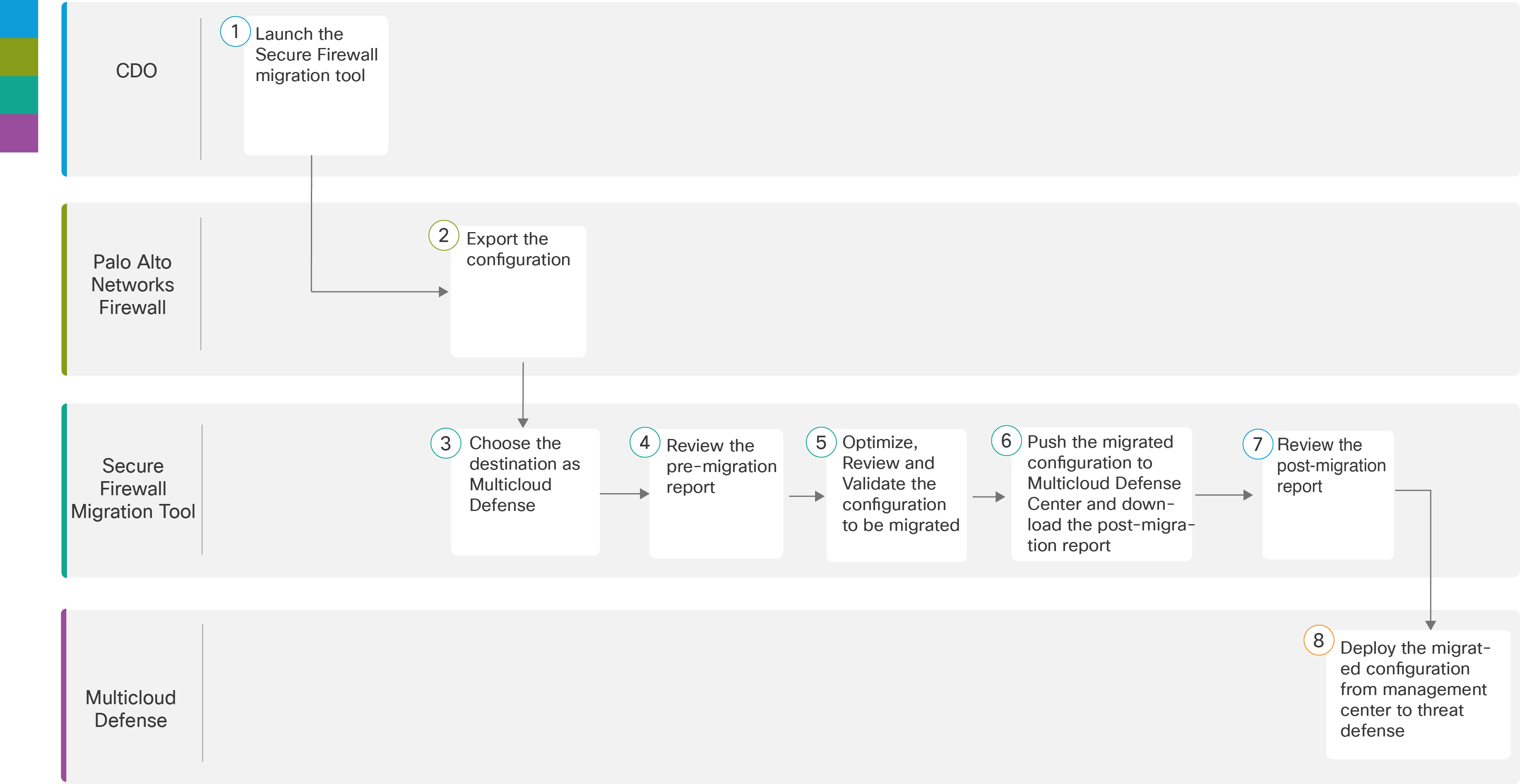
|
Step 5 | Navigate to where you downloaded the pre migration report and review the report. For more information, see Review the Premigration Report. |
Step 6 | Optimize and review the configuration carefully and validate that it is correct. For detailed steps, see Optimize, Review, and Validate. |
Step 7 | Push the migrated configuration to Multicloud Defense and download the post-migration report. This step in the migration process sends the migrated configuration to Multicloud Defense and allows you to download the post-migration report. For detailed steps, see Push the Configuration to Multicloud Defense. |
Step 8 | Navigate to where you downloaded the post migration report and review the report. For detailed steps, see Review the Postmigration Report. |
Step 9 | Verify the migrated configurations in Multicloud Defense and use them as required in configuring gateways. |
Your Palo Alto Networks firewall configuration is successfully migrated to Multicloud Defense and is ready for use in configuring gateways.