View summary dashboard
The Summary dashboard provides a consolidated view of all insights across your environment. It enables identification of areas that require attention and gives you the ability to drill down for operational, configuration, and security analysis. You can filter insights by time range, severity, and status.
AgenticOps summary dashboard
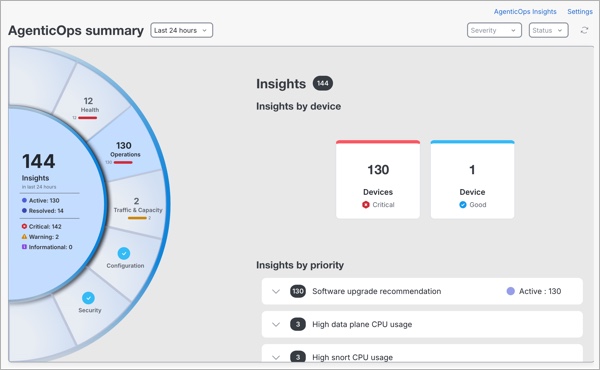
-
Insights visualization panel: Visual representation of your insights, helping you quickly understand overall system posture and where to prioritize action.
-
The inner ring summarizes insights by status and severity.
-
The outer ring represents insight categories. Selecting a category displays related details.
The insight categories include:
-
Operations: Focuses on insights that help maintain the operational health and software lifecycle readiness of your devices. This includes upgrade recommendations for your Firewall Threat Defense devices and End-of-Life notifications.
-
Configuration: Focuses on insights that evaluate your network policies, configurations, and adherence to Cisco Firewall best practices. This includes identifying misconfigurations, policy anomalies, and deviations that may impact performance, security, or compliance.
-
Security: Focuses on insights that detect suspicious, risky, or anomalous activities within your environment. These insights highlight behaviors that may indicate compromised accounts and malicious intent.
-
Select any insight category to view the insights associated with it.
-
-
Insights by device: Click on a device to view insights.
-
Insights by priority: Expand the section to view all devices with related insights.
-
Use the icons at the top right of the page for additional actions:
-
AgenticOps Insights: Navigate to the view of all AgenticOps insights.
-
Settings: Navigate to configure preferences and thresholds for insights.
-
Confidence levels in AgenticOps
A confidence level represents the reliability of a forecast-based insight generated by AgenticOps. It indicates how accurately AgenticOps can predict future behavior for a given condition, helping you decide when immediate action is required versus when monitoring is sufficient.
Applicable forecast-based insight types
Confidence levels are displayed for these forecast-based AgenticOps insights:
-
Remote Access VPN – Maximum Sessions Nearing Limit
-
CPU (LINA) Utilization Forecast Breach
-
CPU (Snort) Utilization Forecast Breach
-
Memory (LINA) Utilization Forecast Breach
-
Memory (Snort) Utilization Forecast Breach
How AgenticOps determines confidence levels ?
For forecast-based insights, such as High Snort Memory Usage, High Snort CPU Usage, and RA VPN Forecast, AgenticOpsevaluates how accurately its machine learning models can predict future behavior using historical patterns and current trends.
Based on this forecast accuracy, each insight is automatically assigned a confidence level. Insights that do not meet a minimum reliability threshold are not generated.
-
High
-
The forecast is highly reliable and strongly supported by historical data.
-
Recommended action: Prioritize the investigation and take proactive corrective measures.
-
-
Medium
-
The forecast is reliable but may show moderate variability.
-
Indicates a strong trend that is likely to continue.
-
Recommended action: Review the insight and plan mitigation.
-
-
Low
-
The forecast indicates a possible emerging condition.
-
Limited data or higher variability reduces certainty.
-
Recommended action: Monitor closely and validate with additional operational context.
-
-
Very low
-
The forecast signal is weak or in an early stage.
-
Higher uncertainty due to insufficient or inconsistent data.
-
Recommended action: Observe trends. No immediate action is required.
-
Insight statuses and transitions
This table outlines the possible insight statuses, their descriptions, transitions, and examples.
|
Status |
Description |
Transition |
Triggered by |
Example |
|---|---|---|---|---|
|
Active |
|
– |
System |
Upgrade options suggested for Firewall Threat Defense devices. |
|
Resolved |
|
Active to Resolved: After you fix the issue and the system confirms it in the next check. |
|
Overlapping firewall rules corrected by the user. |
|
Not Applicable (N/A) |
|
Active to Not Applicable |
System |
|