Managing Catalyst SD-WAN Manager using Security Cloud Control
The integration of Catalyst SD-WAN Manager with Security Cloud Control Firewall Management enables you to manage Next-Generation Firewall (NGFW) capabilities through Security Cloud Control platform.
Summary
The key components involved in managing Catalyst SD-WAN Manager using Security Cloud Control are:
-
Catalyst SD-WAN Manager: Provides SD-WAN Analytics services and deploys policy groups to routers
-
Security Cloud Control: Manages security objects, profiles, and NGFW policies centrally
-
Secure Router routers: Execute deployed firewall policies and generate security events
Workflow
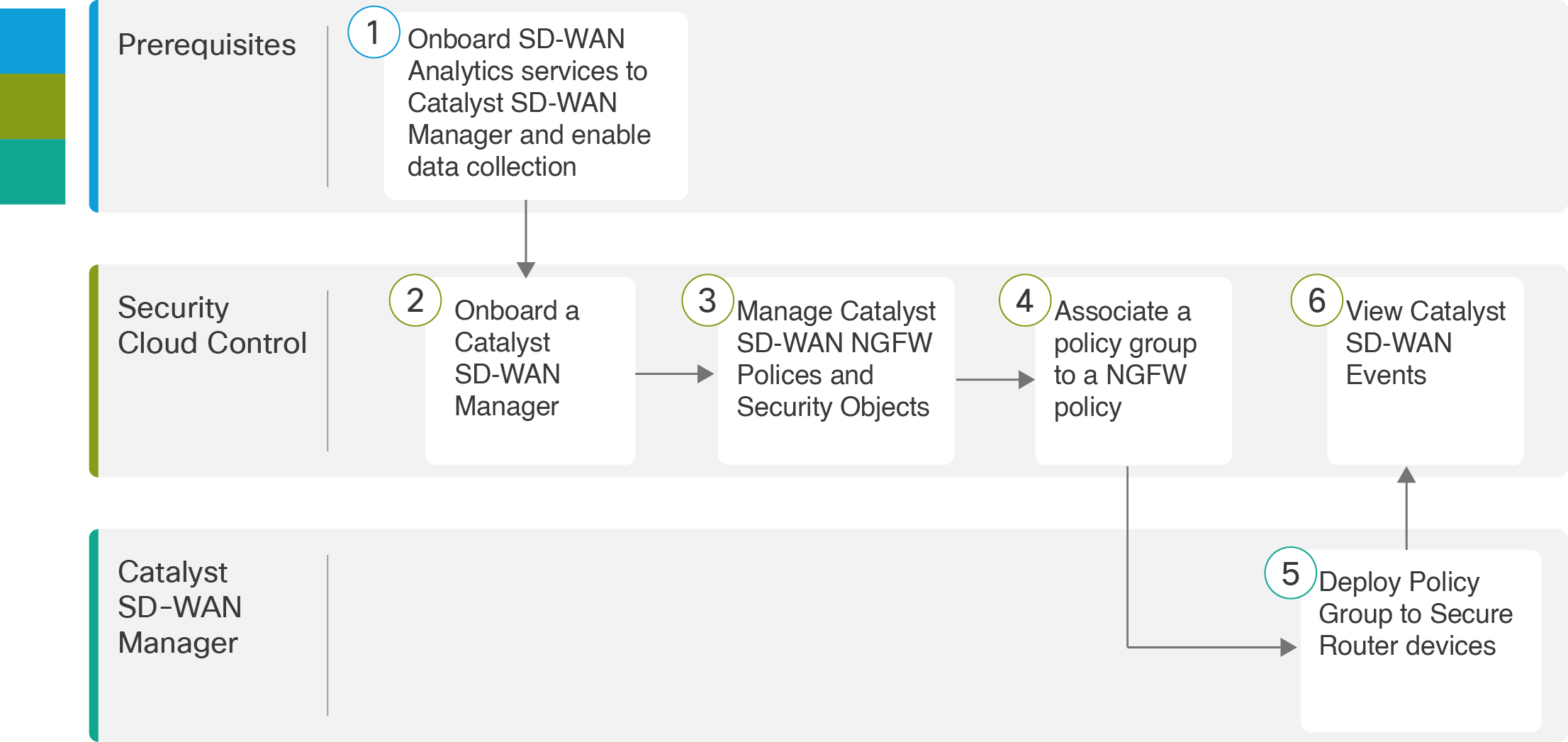
These are the stages of managing Catalyst SD-WAN Manager using Security Cloud Control:
- Prerequisites: Onboard SD-WAN Analytics services to Catalyst SD-WAN Manager and enable data collection. For more information, see Onboard Cisco SD-WAN analytics.
- In Security Cloud Control, onboard your Catalyst SD-WAN Manager. The onboarding process also imports your associated Secure Router routers. For more information, see Integrate Catalyst SD-WAN Manager with Security Cloud Control.
- In Security Cloud Control, create, modify, or delete Catalyst SD-WAN security objects, security profiles, and Next-Generation Firewall (NGFW) policies. For more information, see Manage objects and profiles and Manage NGFW policies.
- In Security Cloud Control, associate a policy group to your Catalyst SD-WAN NGFW policy. For more information, see Associate a group policy.
- In Catalyst SD-WAN Manager, deploy the policy group to Secure Router routers. For more information, see Policy groups configuration.
- In Security Cloud Control, view the security events received from Catalyst SD-WAN with Security Analytics and Logging for monitoring and threat detection. For more information, see Security Analytics and Logging (Saas) for Catalyst SD-WAN Devices.